When a customer buys a package through the store, they will select the package starting date before adding the package to their shopping cart. The list of possible starting dates available to the customer is controlled by the store listing Dates option.
This article explains the different Dates options available. These options will change depending on whether the package type is on a weekly or monthly basis. The examples below assume a monthly basis, however a weekly basis is very similar.
Current month only
This option means that the package will only be available starting during the current calendar month. For example, during January, the customer will only have the option to buy the package starting in January. Note that the package might end in February or later if the duration is longer than 1 month.
This is what the store listing would look like in January 2016:

Next month only
This option is similar to above, except the starting date will be the next calendar month. For example, during January, packages can be bought starting in February.
This is what the store listing would look like in January 2016:

All months from current until specific
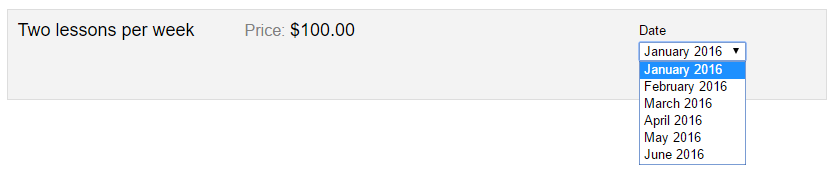
This option allows a range of dates starting in the current calendar month and ending in a specific month that you choose. If you select this option, a Latest Date option will appear directly below the Dates option allowing you to select a specific last month.
Here is what the store listing would look like in January 2016 if the Latest Date option was set to June 2016:
All months from next until specific
This option is similar to above, except the next calendar month is used instead of the current month.
Here is what the store listing would look like in January 2016 if the Latest Date option was set to June 2016:

All months from specific until specific
This option allows a range of dates starting and ending in two specific months that you choose. If you select this option, an Earliest Date and a Latest Date option will appear so that you can select the two specific months.
Here is what the store listing would look like throughout the year if the Earliest Date option was set to March 2016 and the Latest Date option was set to June 2016:

This option is particularly useful if you’d like the package to always start on a fixed date regardless of when it was purchased. For example, you might want all yearly memberships to always start in January rather than on a rolling basis throughout the year. You would set up a package type with a duration of 12 months and then for the store listing set the Earliest Date and Latest Date options to the same month.
Here is what the store listing would look like throughout the year if the Earliest Date option was set to January 2016 and the Latest Date option was also set to January 2016:
