When a package is added to a customer’s account, two steps instantly and automatically take place.
First, credits are added to the customer’s account as part of the package. Each credit represents a payment of a single lesson or class.
Next, scheduled lessons and classes are matched to those credits. Their billing statuses are updated to “Credited” to indicate that they are part of the package and do not need to be billed separately.
The cumulative effect of these steps is that lessons and classes that fit in the package are paid, and those that do not fit remain unpaid.
Adding credits
When a package is added to a customer’s account, all the credits in the package are automatically added for you. The credits are distributed based on the settings of the selected package type, which you will set up in advance.
If the package is ever deleted, then all the credits contained in the package will be deleted as well.
Below are a few different examples of how you might set up some package types, and how credits would be distributed when a package is added to a customer’s account with that package type selected.
Example: Monthly package with 5 lessons
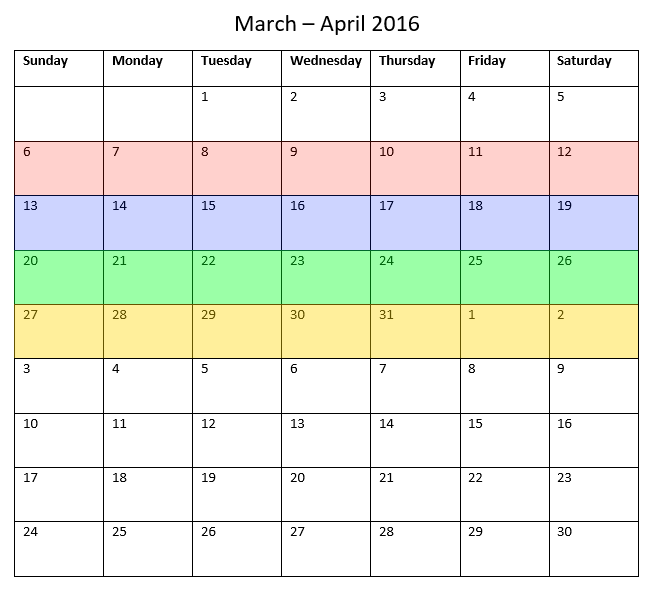
If a customer buys this package, then they would receive 5 lesson credits. Each credit would be valid for the entire calendar month, in this case March 1 to March 31. This is highlighted below.
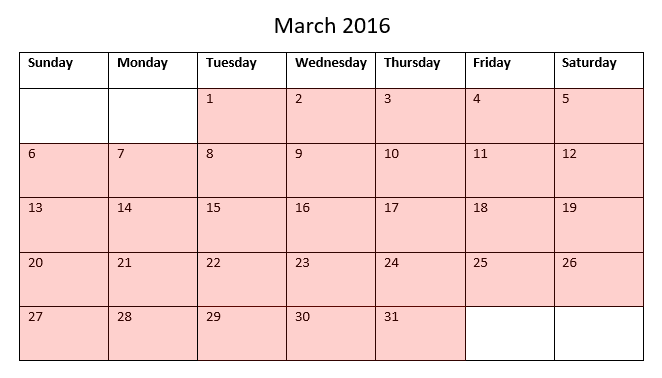
Since each credit is valid for the entire month, the customer can schedule their lessons for any time during the month. The lessons could be scheduled with one per week, all five in a single week, or any other arrangement.
If the customer buys the package again for next month, then they would receive another 5 credits valid for the next month, in this case April 1 to April 30. The credits from the March package are not affected.
Example: Monthly package with 1 lesson per week
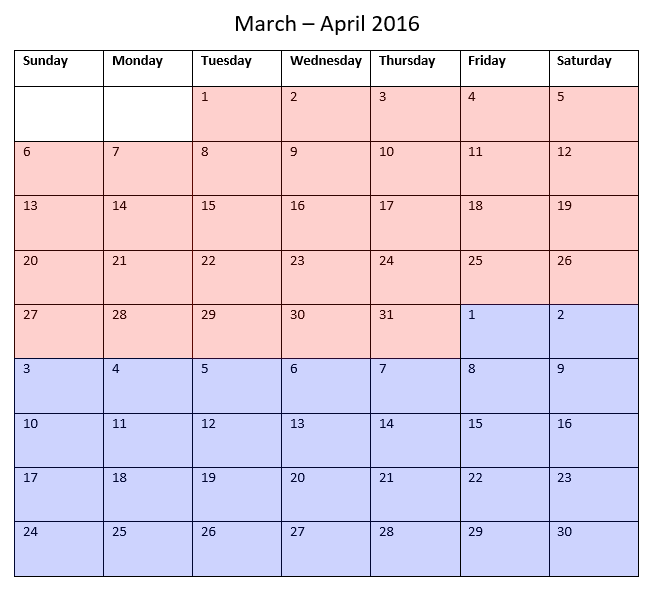
If a customer buys this package, then they would receive 1 credit for each week of the month. This is highlighted below. Notice that the credits for the first and last weeks of the month (March 1 - 5 and March 27 - 31) are not valid for the full 7 days of the week since some days fall outside the month boundaries.

If the package is bought again for the next month, credits from the two packages will be combined as needed to handle the overlapping week between the two months. Notice that the week of March 27 - April 2 correctly receives a single credit for the entire week, even though that week is part of both March and April.
Example: 2 week package with 1 lesson per week
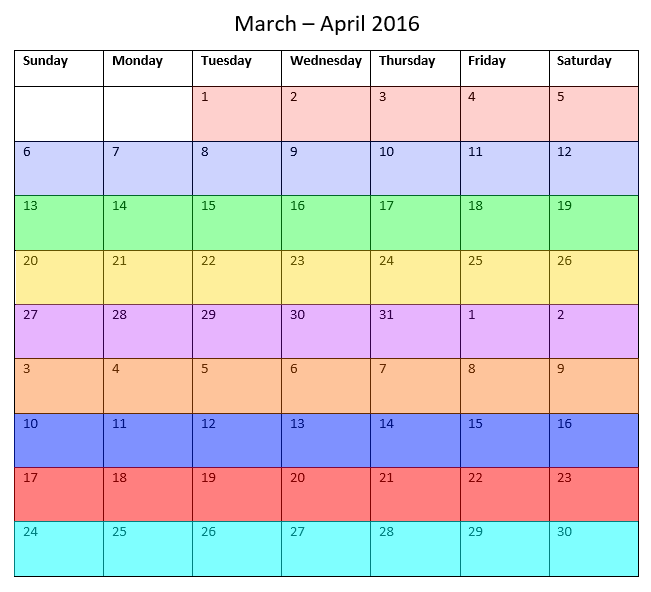
If a customer buys this package, then they would receive 1 credit for each week in the package. This is highlighted below.
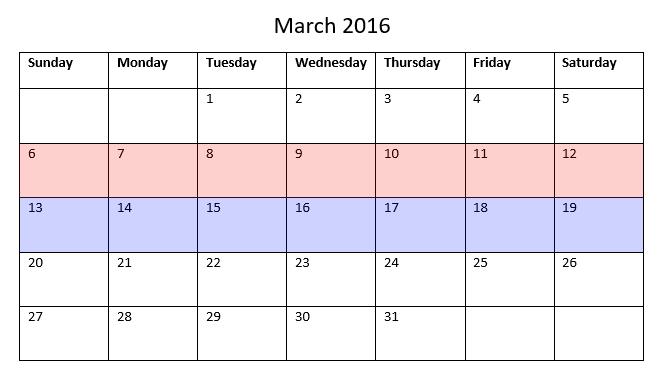
If the package is bought again for the next two weeks, another 2 credits will be added. The credits are not affected by any month boundaries since the package type is defined in terms of weeks, not months.
Matching credits
Matching involves finding any unpaid lessons and classes on the calendar, and then finding available open credits. If a match is found, the billing status of the lesson or class is updated to “Credited”, and it will no longer appear in the customer’s unbilled list. The credit is marked as used, and will not be matched to any other lessons or classes.
If there is more than one available credit that can be matched to a specific lesson or class, then the system will decide which credit to use based on the credit expiration date and other factors.
If there are any scheduling changes, then the credits will be rematched to another lesson or class.
Lessons and classes that do not have a matching credit will remain unpaid. For example, the customer might have enough credits for 5 lessons per month, but has actually scheduled 6 lessons. The extra lesson will remain unpaid for you to bill separately.
Order
The matching system handles all combinations of scheduling/billing orderings, including:
- Adding a package first, then booking lessons and classes later.
- Booking lessons and classes first, then adding a package later.
- Rescheduling and cancelling lessons and classes in a package.
- Deleting a package and replacing it with another package.
- Adding multiple overlapping packages.
Double billing
Lessons and classes will never be double billed. That is, they will only be credited as part of a package if they are currently unbilled. Therefore, if a lesson or class is already paid it will never be matched - even if it could have fit in the package. This means you should not bill lessons and classes that you intend to include in a package later.
Membership
Any memberships included in a package are not part of the matching system. If membership is included in a package, then a new membership record will be automatically added to the customer’s account. If the package is deleted, then that membership record will be deleted. The package will not attempt to match any existing membership records.
Accounts
Matching is always per-package - the account used to schedule or bill does not affect matching.
For example, the customer might buy the package themselves from the store, or the package could be added by a manager. Lessons or classes could be scheduled by the customer, coach, or manager. In all cases, matching would be identical.
Change the matching behavior
By default, credits are matched to lessons and classes immediately - either when the booking is created or the credit is added. However, in some cases you may wish for the credit to be not matched immediately, but instead matched when the lesson or class occurs, i.e. at time of service. This behavior can be customized for credits contained in specific packages.
There are a few scenarios in which you may want this behavior to occur.
- When the customer buys a “coupon book” or a specific number of credits to be used at any time, you may wish for the credits to be applied only at time of service.
- When the customer is expected to buy additional packages that will be used immediately upon purchase, and a second package to be only be used only if no other credits are available. In this case you would configure the second package to have delayed matching so that the customer has the opportunity to purchase the primary package first.
Setup
To specify this behavior, select “Apply at Time of Service” when configuring a package type.
If the “Apply at Time of Service” option is changed for an existing package type, then the new setting will be reflected for all existing packages of that type.
Rules for when credits are applied
- If the customer is required to pay upfront, then any lesson or class booked will always consume a credit upon booking. If an “immediate” credit is found, then it will be used first; if one is not found, then a “delayed” credit, if one exists, will be applied. If no credit is found, then the booking will be blocked.
- If the student is not required to pay upfront, then delayed credits will always be applied at time of service.
- If staff book a lesson or class on behalf of a customer, then the credit will always be applied to the booking at time of service, even if the customer is required to pay upfront.
Booking cancellations
When an upcoming booking is canceled, then the credit will always be freed and matched to another lesson or class, if one exists. The credit is always freed regardless of whether it is an “immediate” or “delayed” credit.